Welcome to Blue Pecan: we offer tailored In house/ onsite Excel training at your business premises. We are based in Sussex, UK and cover the home counties and London including Sussex, Dorset, Hampshire, Kent, Essex, Berkshire & Buckinghamshire. Call 0800 612 4105 to enquire. |
The clean function removes non-printable characters from text. Typically you might have imported the text from another application and need to cleanse it before it can be used effectively in Excel. To see what each of the 255 characters is, starting in cell A1 of a new worksheet type =CHAR(ROW()). Now copy this formula down to row 255. The row number is being used in the formula to specify the character value, as in =CHAR(1), =CHAR(2) and so on.
The CLEAN function has one argument: =CLEAN(text), text being the cell that contains the text you wish to cleanse.
Here is an example of text containing non-printable characters:
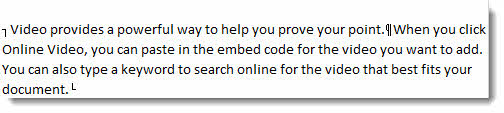
Of the 255 characters available, 1 – 31 are non-printable. CLEAN deals with all these 31 characters. However characters 127, 129, 141, 143, 144 and 157 are also non-printable but are not cleansed by the CLEAN filter.
To clean these characters you need to use the SUBSTITUTE function to swap the character values for values in the range 1 -31 so that you can then use the CLEAN function.
Eg =CLEAN(SUBSTITUTE(A4,CHAR(127),CHAR(1)))